FedRAMP PAIN Levels: How to Rate Potential Agency Impact for Vulnerabilities

FedRAMP PAIN levels (N0 to N5) estimate how badly exploiting a vulnerability would likely affect the agencies using a cloud service. Here's how each level is defined, how PAIN works with internet reachability and exploitability under the VER rules, and why the rating should change as your system does.

Isaac Teuscher
|
53
min read

In This Article

Watch the video: What are the FedRAMP Pain Levels?


What are FedRAMP PAIN levels, and how should they change the way you prioritize vulnerabilities? If you're a cloud service provider getting ready for FedRAMP's new vulnerability rules, you've probably seen N0 through N5 show up in the documentation and wondered what you're supposed to do with them.

Learning a new rating scale while the deadline gets closer is a lot to take on.

This article explains what PAIN stands for, how FedRAMP defines each level, how PAIN works alongside internet reachability and exploitability, and why your rating should change as your system does.

What are FedRAMP PAIN levels?

PAIN stands for Potential Agency Impact N-rating. It's a great acronym, and it's also a useful tool for deciding how to prioritize the mitigation or remediation of vulnerabilities in your FedRAMP certified cloud service offering.

FedRAMP defines potential agency impact as the estimated cumulative effect of unauthorized access, disruption, harm or other adverse impacts to all agencies using the cloud service that are likely to result from security incidents or exploitation of vulnerabilities in the cloud service offering.

In short: PAIN is an estimate of how badly exploiting a vulnerability would hurt the agencies using your service.

The PAIN question

When you assign a PAIN level, keep one question in mind:

How bad would it be for our agency customers?

Rate the likely impact, not the worst-case scenario

The PAIN level reflects what is likely to result from exploiting a vulnerability.

You aren't rating the edge cases where things go unusually well or unusually badly. You're rating the most likely outcome.

“We’re not thinking about the Mission Impossible case of someone coming down through the air conditioning vent and stealing the CIA book. We’re focused on what is the likely case of this vulnerability being exploited.”

Isaac Teuscher

FedRAMP Lead, Paramify

This matters because a PAIN level is ultimately an estimate. None of us can predict the future, but we still need to make risk-based decisions on accurate data. The more precise your estimates are, and the more they rest on objective values instead of subjective ones, the better off you'll be.

Rate PAIN levels from your real system context, not guesswork.

See how Paramify does it

The FedRAMP PAIN scale: N0 to N5

PAIN levels range from N0 to N5. Each level describes how severe a vulnerability's impact would be on your agency customers if it were exploited.

N0

Extremely unlikely to have any adverse impact on an agency.

N1

A minimal customer effect on one or more agencies.

N2

A narrow customer effect on one or more agencies.

N3

A disruptive customer effect on one agency.

N4

A debilitating customer effect on one agency, or a disruptive customer effect on more than one agency.

N5

A debilitating customer effect on more than one agency.

FedRAMP's full wording for each level is in the Vulnerability Evaluation and Reporting rules on fedramp.gov.

How PAIN fits into FedRAMP Vulnerability Evaluation and Reporting

PAIN levels are part of FedRAMP's Vulnerability Evaluation and Reporting (VER) standard. Under VER, cloud service providers evaluate vulnerabilities in the context of their own cloud service offering, then mitigate or remediate them on specific timelines based on three values.

For a side-by-side look at how VER relates to VDR, see What Are FedRAMP VDR and VER?

Factor 1PAIN level

How severe the impact of exploitation would be on your agency customers.

Factor 2Internet reachability

Whether the vulnerability is internet reachable.

Factor 3Exploitability

Whether the vulnerability is likely to be exploited.

Together, those three factors show what the risk of a vulnerability really is for the agency customers using your cloud service offering.

Why PAIN goes beyond a CVSS base score

A CVSS base score tells you the technical severity of a vulnerability. PAIN goes further by accounting for your specific cloud service offering and how you protect your agency customers' data.

If you want the longer case for why CVSS alone falls short under FedRAMP, read Why Isn't CVSS Enough for FedRAMP Anymore?

There's also a difference in how the two change over time. A CVSS base score is typically set in stone at low, moderate or high once it's published. It doesn't change based on the current state of your cloud service offering.

A PAIN level is something you establish from your best information and then keep updating as you respond to vulnerabilities and investigate incidents or new threat intelligence.

When to update FedRAMP PAIN levels after mitigation

Estimating a PAIN level isn't a one-time thing. Potential agency impact can change as you implement mitigation strategies that reduce the blast radius, meaning how much a vulnerability's exploitation would affect your agency customers.

That's why the FedRAMP VER rules require you to report the initial PAIN level you assigned when you first evaluated the vulnerability, and to keep it updated when you re-evaluate to a higher or lower level.

Re-evaluations happen as you gain more threat intelligence, harden your system or put mitigation measures in place. The vulnerability detail requirements list both the historical and current PAIN rating, plus the time and rating of each completed reduction.

This makes PAIN a living, breathing risk evaluator. It's useful to agencies, which are required to do risk-based vulnerability assessment and response across all of their information systems. CISA's Binding Operational Directive 26-04 also mandates the VER rules, which apply to FedRAMP certifications starting December 7, 2026.

For what that means for your timeline, see Understanding BOD 26-04 and FedRAMP VDR and What Happens If You Miss the December 7 FedRAMP VDR Deadline?

Keep every PAIN rating and reduction on record, automatically.

Request a demo

How to calculate and track FedRAMP PAIN levels with Paramify
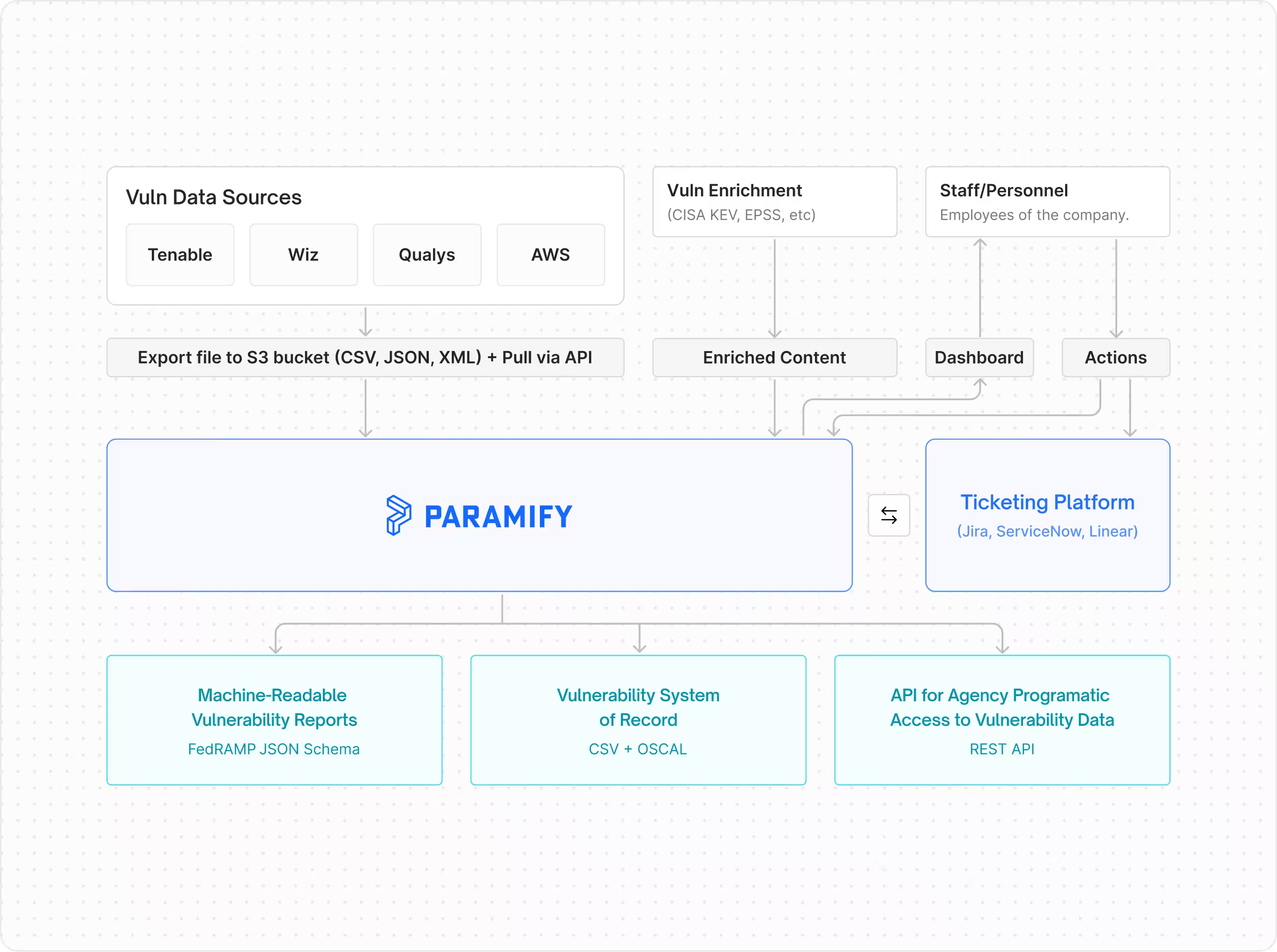
A scanner can tell you a vulnerability exists and give you its CVSS score. It can't tell you how exploitation would affect your agency customers, because that depends on your architecture, your mitigations and who uses your service.

That context is what PAIN asks for, and it's where Paramify's VDR and VER tool comes in.

PAIN levels from asset context

Every vulnerability gets an N0 to N5 rating based on asset context, mapped to FedRAMP's required remediation timeframes.

Exploitability and reachability

Paramify classifies likely exploitable (LEV) and internet-reachable (IRV) vulnerabilities using FedRAMP defaults or rules you customize.

Due dates that follow the rating

Each finding is tracked as an Issue, with its SLA due date calculated automatically and flagged Due Soon or Overdue.

Machine-readable VER reports

Findings feed FedRAMP schema-validated reports that agencies can pull by API instead of waiting on a submission.

Because every finding stays on record from open to remediated, your initial PAIN rating and each re-evaluation are captured as they happen.

Your team's time goes to hardening the system instead of rebuilding spreadsheets.

Paramify is itself FedRAMP 20x Class C Certified, and it was built for FedRAMP 20x and the 2026 consolidated rules. If you're comparing options, How to Choose a FedRAMP VDR Tool walks through what to look for.

FEDRAMP VER

PAIN levels you can defend, updated as your system changes.

Paramify rates every vulnerability N0 to N5 from your asset context, classifies LEV and IRV, and turns the results into machine-readable reports agencies can pull any time.

Request a demo

Put PAIN levels to work in your vulnerability program

When you hear N0, N3 or N5 in the context of FedRAMP vulnerability evaluation, it refers to the Potential Agency Impact N-rating: a cloud service provider's current best estimate of how bad exploitation of a vulnerability would be for agencies in the most likely scenarios.

Rate the likely case, weigh it alongside internet reachability and exploitability, and keep the rating current as you reduce the blast radius.

Paramify can help you calculate, track and report PAIN levels as part of your VER program. If you have questions about PAIN or VER, contact us or request a demo below.

Read more

FAQ

What does PAIN stand for in FedRAMP?

PAIN stands for Potential Agency Impact N-rating. It's a cloud service provider's estimate of how badly exploiting a vulnerability would hurt the agencies using its service.

What are the FedRAMP PAIN levels?

There are six levels, N0 through N5. N0 means exploitation is extremely unlikely to have any adverse impact on an agency. N5 means a debilitating customer effect on more than one agency.

Should PAIN reflect the worst-case scenario?

No. PAIN reflects the likely result of exploitation, not rare edge cases. Base it on objective values wherever you can.

How is PAIN different from a CVSS score?

A CVSS base score describes technical severity and stays fixed once published. PAIN reflects your specific cloud service offering and changes as you add mitigations or learn more.

Do you have to report changes to a PAIN level?

Yes. The VER rules require you to report the initial PAIN level and keep it updated as you re-evaluate it higher or lower.

What other factors does VER use besides PAIN?

VER also looks at whether a vulnerability is internet reachable and whether it's likely to be exploited. Together, the three factors set how quickly you need to respond.

When do the VER rules take effect?

Per fedramp.gov, VER applies to obtaining and maintaining FedRAMP certification starting December 7, 2026, with a grace period that ends March 7, 2027.

Isaac Teuscher
Leads the technical implementation of cloud and AI-driven security as Head of Security at Paramify. With experience in NIST 800-53 and FedRAMP, Isaac collaborates with executive teams to build scalable security programs that meet the highest federal compliance standards.
Nov 2026
Related posts

Paramify blog

Interviews, tips, guides, industry best practices, and news.

FedRAMP 20x Transparency: Why an All-Green Trust Center Isn't the Goal

FedRAMP 20x makes it okay for cloud providers to show their gaps, explain the protections around them, and let agencies check the data themselves. Here's why an honest trust center beats an all-green one, and why VDR and VER are step one toward 20x.
Read post

Why Isn't CVSS Enough for FedRAMP Anymore?

A CVSS score measures a vulnerability's technical severity, but FedRAMP VDR and VER ask how much risk it poses to the agencies using your service. Here's how to prioritize with likely exploitability, internet reachability, PAIN, CISA KEV and EPSS.
Read post

What Happens If You Miss the December 7 FedRAMP VDR Deadline? The Grace Period, Explained

FedRAMP’s VDR and VER rules become required on December 7, 2026, and certified providers who aren’t following them by March 7, 2027 lose certification until they are.
Read post

Frequently Asked Questions

Thank you! Your submission has been received!
Oops! Something went wrong while submitting the form.
Can compliance advisors or consultants work in Paramify with us, and does it help with managed-service models?

Absolutely. Paramify is used by many advisory partners, RPOs, and MSPs to guide, generate, and manage documentation, perform gap assessments, facilitate policy/procedure drafting, and oversee remediation activities. Advisors can fill out templates, manage controls, and generate client-ready documents.

‍

We have privacy or compliance concerns, can we restrict what external reviewers can access?

Yes, you can assign role-based access controls in Paramify. Advisors or auditors can be given access only to certain programs, assessment and their related evidence.

Sensitive information can be withheld or redacted as needed, and only certified reviewers see specific items.

‍

Can auditors or advisory partners get direct access to our Paramify environment, or do we have to export everything for them?

Yes, Paramify allows external assessors/auditors and advisors to be invited as users, with controlled permission levels. They can review specific evidence, policies, SSPs, POA&Ms, or assessment modules without accessing broader company data. 

Documentation — such as Appendix A, SSPs, procedures, and POAMs — can also be exported in multiple standard formats (Word, Excel, OSCAL, EMASS, PDF) as needed.

Can I get matched with an Advisor based on my specific needs?

Yes. You can use the Get Matched feature on our website. We will review your specific compliance goals and connect you with the partner best suited for your industry and timeline.

How do Advisors use Paramify during a FedRAMP engagement?

Advisors use Paramify to conduct Gap Assessments, map controls, Automate SSPs, and manage POA&Ms.

Instead of spending months writing Word documents, the Advisor inputs the system architecture and control implementations into Paramify, which then generates the required NIST-formatted documentation.

Does Paramify compete with its Advisors?

No. Paramify is a software company. We do not offer independent audit or long-term consulting services. Our goal is to empower Advisors with better tools so they can serve more clients effectively.

‍

What are the different partner tiers?

We feature Premier Partners prominently on our site. These are firms that have demonstrated a high level of proficiency with the Paramify platform and have successfully helped many clients through the certification process using our tools.

How do I become an official Paramify Advisor Partner?

We look for firms with a proven track record in federal compliance. If you are interested in joining our network and leveraging our automation products, you can reach out via our contact page or schedule a demo to see how our tools fit into your workflow.

What is the benefit of using an Advisor who uses Paramify vs. one who doesn't?

Advisors using Paramify can accelerate your implementation and typically deliver documentation in a fraction of the time it takes without Paramify. This means:

  • Faster Implementation: An accelerated implementation roadmap keeps timelines predictable.
  • Lower Costs: Reduced manual consultant hours.
  • Higher Accuracy: Automation eliminates the "copy-paste" errors common in traditional SSPs.‍
  • Easier Maintenance: Your Advisor can help you manage POA&Ms and continuous monitoring within the platform.
Does working with an Advisor on this list guarantee FedRAMP or CMMC authorization?

No firm can "guarantee" authorization, as the final decision rests with the government authorizing body (e.g., the FedRAMP PMO or the DoD).

However, working with a Paramify Advisor significantly reduces the risk of documentation errors and ensures your package is built on a technically sound, automated foundation.

‍

How do I choose the right Advisor for my organization?

Our Advisor page allows you to filter partners by their specific expertise, such as FedRAMP, CMMC, FISMA, or GovRAMP.

Why does Paramify partner with Advisors?

Paramify is an “Iron Man suit” for GRC experts. We provide automation technology to generate and manage compliance documentation (like SSPs snd POA&Ms) while Advisors provide the expert human oversight and implementation expertise.

Together, we offer a "best-of-both-worlds" solution: expert consulting powered by industry-leading automation and risk management planning.

What is the Paramify Advisor Partner Network?

The Paramify Advisor Partner Network is a curated group of cybersecurity and compliance firms — including CMMC Registered Practitioner Organizations (RPOs) and accredited Independent Assessors— that use Paramify’s platform to deliver faster, more accurate compliance outcomes for their clients.

I already have an advisor or very capable GRC team. Why do I need Paramify?

Use Paramify's Risk Solution platform to automate ATO packages, improving cost efficiency, speed, and accuracy. This frees your team to focus on more valuable efforts like security posture enhancement and compliance improvements.