FedRAMP VER Report Requirements: What Goes in the Three JSON Files

FedRAMP VER reporting comes down to three machine-readable JSON files built from one source of truth. Here's what each file covers, what's in every vulnerability record, how agencies use the data and how the 192-day rule sorts vulnerabilities into the accepted report.

Isaac Teuscher
|
53
min read

In This Article

Watch the video: What Goes in the VER Machine-Readable Report?


What exactly goes in the FedRAMP VER machine-readable report? If you've spent years building POA&M spreadsheets and walking agency reviewers through them line by line, this change asks a lot of your team. The new rules replace that spreadsheet with structured JSON files that agencies pull straight into their own tools, and the requirements have short names like VER-RPT-VDT that are easy to mix up.

This article walks through the three JSON files FedRAMP's Vulnerability Evaluation and Reporting (VER) rules call for, why FedRAMP is moving away from human-readable reports, what each vulnerability record contains, and how the 192-day rule decides which report a vulnerability belongs in.

What are the FedRAMP VER machine-readable reports?

FedRAMP's Vulnerability Evaluation and Reporting rules define persistent reporting requirements for cloud service providers.

Those requirements come down to three machine-readable JSON files, and FedRAMP publishes an official JSON schema for each one.

Rule IDReportWhat it covers
VER-RPT-VDT Vulnerability detail report All non-accepted vulnerabilities and the detection and response activity that covers them, within the most recent period. That period follows the cadence you've defined for your vulnerability detection and response activities.
VER-RPT-AVI Accepted vulnerability info A very similar file with the same kind of detection and response activity, but for the accepted vulnerabilities in that period.
VER-TFR-MRH Historical vulnerability evaluation and reporting activity A historical snapshot of active and accepted vulnerabilities over a period of time, frequently about a month.

All three should come from the same source of truth about your vulnerability detection, response and evaluation activities. They're three similar files that give your federal agency customers different views of the same work.

FedRAMP also sets how often the historical activity should be updated, by certification class: at least monthly for Class A and Class B, every 14 days for Class C and every 7 days for Class D, according to the VER rules.

Why FedRAMP is replacing POA&M spreadsheets with machine-readable reports

The value of these reports is biggest on the agency side. Government customers reviewing vulnerabilities in your cloud service offering will no longer ask for an Excel spreadsheet of your POA&Ms and then talk through it: let's go through line three, let's go through line four ... etc

That's a slow, manual process.

It takes a lot of time for the cloud service provider to create and update those POA&M spreadsheets, and a lot of time on the agency side to review them and work out what they mean.

“None of that is able to operate at the machine speeds of today, which are needed to help us when vulnerabilities are being exploited faster than ever, driven by AI and other factors.”

Isaac Teuscher

FedRAMP Lead, Paramify

Operating at machine speeds means moving from human-readable reports only, like a PDF or an Excel spreadsheet, to machine-readable reports.

Machine-readable reports aren't meant to be read by a person. They're meant to be pulled in automatically to a GRC or risk management platform.

This shift is on a firm schedule. In Notice NTC-0014, FedRAMP made the Vulnerability Detection and Response (VDR) and VER rules mandatory by December 7, 2026 to align with CISA BOD 26-04. If you're weighing what happens after that date, here's how the VDR grace period works.

Replace the POA&M spreadsheet with VER-ready JSON reports.

See how it works

How VER reporting works for cloud service providers and agencies

Every vulnerability in these reports carries a Potential Agency Impact N-rating, or PAIN level, from N0 to N5, along with whether it's internet reachable and whether it's likely exploitable.

If those terms are new, start with what FedRAMP VDR and VER are and how the PAIN scale works.

Here's how that data moves from a cloud service provider to an agency.

You

Your source of truth

Automation detects, evaluates and responds to vulnerabilities. Each one's PAIN level, internet-reachable value and likely-exploitable value lives here.

The handoff

3 JSON reports

  • VER-RPT-VDT
  • VER-RPT-AVI
  • VER-TFR-MRH
The agency

Agency tooling

Pulls the JSON in automatically, sets thresholds, alerts or configurations, and sees the risk to its information system.

What's in each vulnerability record?

Each open vulnerability in these reports includes the same core details.

Open vulnerability record
  • A tracking ID
  • When the vulnerability was detected
  • When the evaluation was finished
  • Whether it's internet reachable
  • Whether it's likely exploitable
  • The historical and current PAIN rating
  • When each PAIN reduction or increase was made
  • When the next reduction is expected, and its target PAIN level

As you carry out ongoing mitigation to reduce the severity of vulnerabilities in your systems, those details update continuously in the machine-readable JSON reports. The agency gets a near real-time view of the likely impact to their system if those vulnerabilities are exploited.

The full VER-RPT-VDT requirement also asks for the source of the detection, whether the vulnerability is or is likely to become overdue, any supplementary information that helps agencies assess the risk, and its final disposition.

Accepted vulnerability records add an explanation of why each one is accepted.

The 192-day rule for accepted vulnerabilities

A vulnerability moves from the non-accepted report to the accepted vulnerability report if it isn't fully mitigated or remediated within 192 days of evaluation. Under VER-TFR-MAV, you must mark a vulnerability as accepted once it's been more than 192 days and it hasn't been fully remediated or mitigated.

That means every vulnerability sits in one of two places.

ReportWhich vulnerabilitiesWhat's happening
Vulnerability detail report (VER-RPT-VDT) Non-accepted vulnerabilities within the recent 192 days Active triage, active analysis or active mitigation
Accepted vulnerability info (VER-RPT-AVI) Accepted vulnerabilities, 192 days or more since evaluation A running list of POA&Ms that haven't been fully remediated and that you're not currently analyzing

Know which VER report every vulnerability belongs in.

Try Paramify

How Paramify produces and ingests FedRAMP VER reports
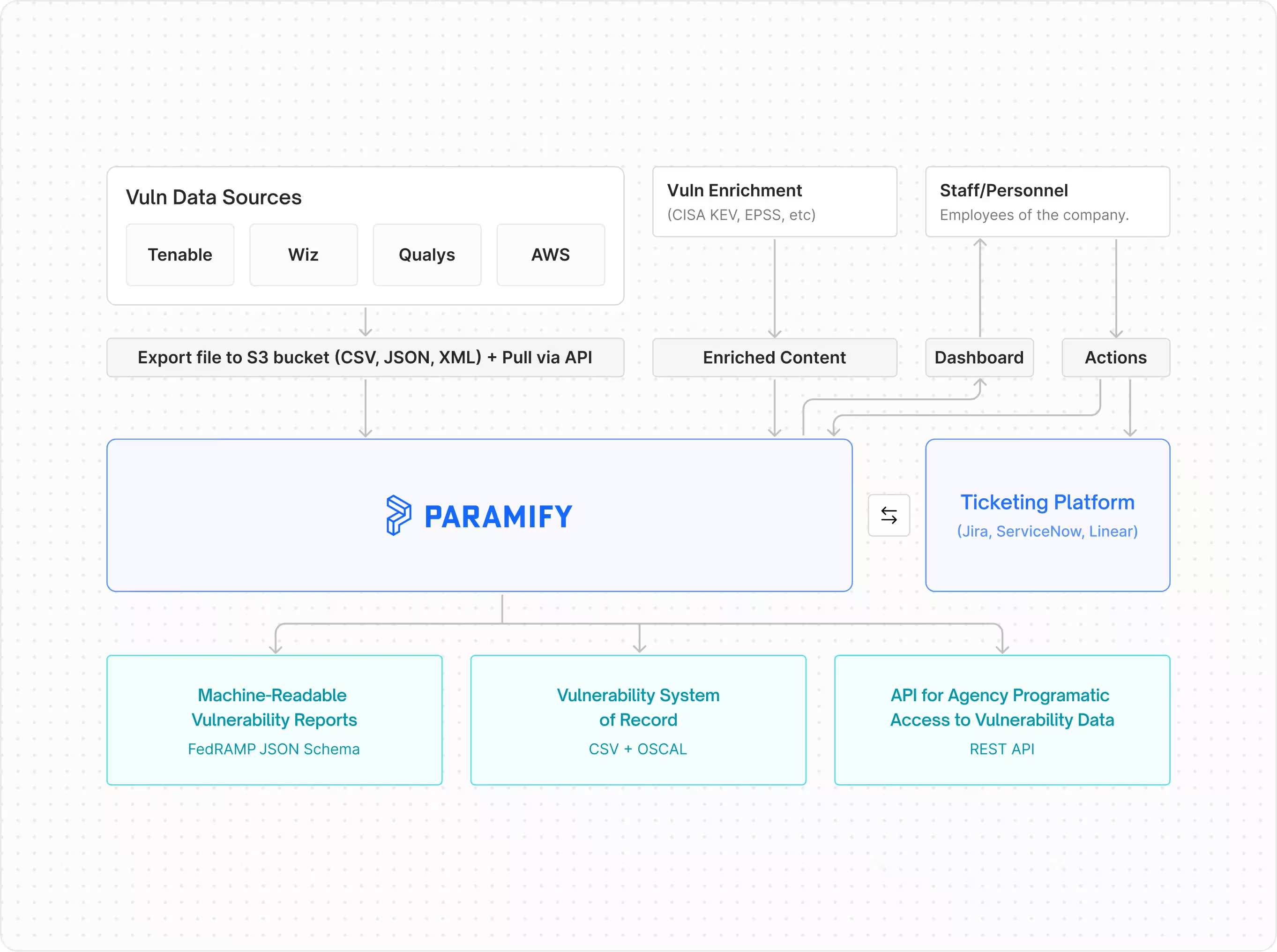
Paramify is a modern GRC tool that supports the FedRAMP Consolidated Rules for 2026 (CR26), including the VDR and VER requirements to produce and ingest machine-readable JSON reports.

Every finding is tracked as an Issue from open to remediated, and that data feeds the three schema-validated VER reports instead of a spreadsheet.

Agencies can pull those reports through an API rather than waiting on a submission.

Calculate PAIN levels

Every vulnerability gets an N0 to N5 Potential Agency Impact rating based on asset context.

Evaluate likely exploitability

Classify vulnerabilities as LEV or NLEV using threat intelligence, reachability and control adoption, with FedRAMP defaults or your own rules.

Determine internet reachability

Correlate scan data with your edge architecture using pre-built FedRAMP reachability rules you can fine-tune.

Produce all three reports

Vulnerability Detail, Accepted Vulnerability Info and Historical VER Activity reports, validated against FedRAMP's schemas.

Track due dates

Each Issue's due date is calculated from its classifications and flagged Due Soon or Overdue.

See the details on the VDR and VER compliance product page, or how VER fits into the rest of Paramify's FedRAMP 20x certification software.

For the full list of reports, here are the CR26 deliverables Paramify automates. If you're comparing options, start with how to choose a FedRAMP VDR tool.

FEDRAMP VER

Produce all three VER reports from one source of truth.

Paramify evaluates PAIN, LEV and IRV for every finding and turns that data into schema-validated JSON your agency customers can pull automatically.

See it in action

Moving from POA&M spreadsheets to VER JSON

FedRAMP VER reporting replaces the line-by-line POA&M review with three machine-readable JSON files: the vulnerability detail report, the accepted vulnerability info and the historical activity report.

It's a lot to take in.

Paramify can help you produce and ingest these reports, so if you have questions or want to see what this looks like in practice, reach out to us or request a demo below.

Read more

FAQ

What are the three FedRAMP VER machine-readable reports?

The vulnerability detail report (VER-RPT-VDT), the accepted vulnerability info report (VER-RPT-AVI) and the historical vulnerability evaluation and reporting activity (VER-TFR-MRH). All three are JSON files built from the same source of truth.

What's the difference between the vulnerability detail report and the accepted vulnerability info report?

The vulnerability detail report covers non-accepted vulnerabilities. The accepted vulnerability info report covers accepted ones. Both include the same kind of detection and response activity for the reporting period.

When does a vulnerability become an accepted vulnerability?

When it isn't fully mitigated or remediated within 192 days of evaluation. VER-TFR-MAV requires you to categorize it as accepted at that point.

What does PAIN mean in FedRAMP VER?

PAIN stands for Potential Agency Impact N-rating. It runs from N0 (exploitation is extremely unlikely to affect agencies) to N5 (a debilitating effect on more than one agency).

Do VER reports replace POA&M spreadsheets?

They replace the spreadsheet workflow. Instead of an Excel file reviewed line by line, agencies pull machine-readable JSON into their own GRC or risk management tools.

How do agencies use VER JSON files?

They ingest the files through automation, set thresholds, alerts or configurations, and get a near real-time view of the risk your cloud service offering poses to their information system.

When are the VER rules required?

FedRAMP made the VDR and VER rules mandatory by December 7, 2026, with a grace period that ends March 7, 2027.

Isaac Teuscher
Leads the technical implementation of cloud and AI-driven security as Head of Security at Paramify. With experience in NIST 800-53 and FedRAMP, Isaac collaborates with executive teams to build scalable security programs that meet the highest federal compliance standards.
Nov 2026
Related posts

Paramify blog

Interviews, tips, guides, industry best practices, and news.

FedRAMP Vulnerability Acceptance and Deviation Requests Under CR26: What CSPs Should Know

FedRAMP's VDR and VER rules turn any vulnerability left unfixed for 192 days into a reportable accepted vulnerability, alongside the four deviation requests providers already use. Here's how PAIN levels differ from risk levels and what Rev 5 providers need in place by December 7, 2026.
Read post

FedRAMP PAIN Levels: How to Rate Potential Agency Impact for Vulnerabilities

FedRAMP PAIN levels (N0 to N5) estimate how badly exploiting a vulnerability would likely affect the agencies using a cloud service. Here's how each level is defined, how PAIN works with internet reachability and exploitability under the VER rules, and why the rating should change as your system does.
Read post

FedRAMP 20x Transparency: Why an All-Green Trust Center Isn't the Goal

FedRAMP 20x makes it okay for cloud providers to show their gaps, explain the protections around them, and let agencies check the data themselves. Here's why an honest trust center beats an all-green one, and why VDR and VER are step one toward 20x.
Read post

Frequently Asked Questions

Thank you! Your submission has been received!
Oops! Something went wrong while submitting the form.
Can compliance advisors or consultants work in Paramify with us, and does it help with managed-service models?

Absolutely. Paramify is used by many advisory partners, RPOs, and MSPs to guide, generate, and manage documentation, perform gap assessments, facilitate policy/procedure drafting, and oversee remediation activities. Advisors can fill out templates, manage controls, and generate client-ready documents.

‍

We have privacy or compliance concerns, can we restrict what external reviewers can access?

Yes, you can assign role-based access controls in Paramify. Advisors or auditors can be given access only to certain programs, assessment and their related evidence.

Sensitive information can be withheld or redacted as needed, and only certified reviewers see specific items.

‍

Can auditors or advisory partners get direct access to our Paramify environment, or do we have to export everything for them?

Yes, Paramify allows external assessors/auditors and advisors to be invited as users, with controlled permission levels. They can review specific evidence, policies, SSPs, POA&Ms, or assessment modules without accessing broader company data. 

Documentation — such as Appendix A, SSPs, procedures, and POAMs — can also be exported in multiple standard formats (Word, Excel, OSCAL, EMASS, PDF) as needed.

Can I get matched with an Advisor based on my specific needs?

Yes. You can use the Get Matched feature on our website. We will review your specific compliance goals and connect you with the partner best suited for your industry and timeline.

How do Advisors use Paramify during a FedRAMP engagement?

Advisors use Paramify to conduct Gap Assessments, map controls, Automate SSPs, and manage POA&Ms.

Instead of spending months writing Word documents, the Advisor inputs the system architecture and control implementations into Paramify, which then generates the required NIST-formatted documentation.

Does Paramify compete with its Advisors?

No. Paramify is a software company. We do not offer independent audit or long-term consulting services. Our goal is to empower Advisors with better tools so they can serve more clients effectively.

‍

What are the different partner tiers?

We feature Premier Partners prominently on our site. These are firms that have demonstrated a high level of proficiency with the Paramify platform and have successfully helped many clients through the certification process using our tools.

How do I become an official Paramify Advisor Partner?

We look for firms with a proven track record in federal compliance. If you are interested in joining our network and leveraging our automation products, you can reach out via our contact page or schedule a demo to see how our tools fit into your workflow.

What is the benefit of using an Advisor who uses Paramify vs. one who doesn't?

Advisors using Paramify can accelerate your implementation and typically deliver documentation in a fraction of the time it takes without Paramify. This means:

  • Faster Implementation: An accelerated implementation roadmap keeps timelines predictable.
  • Lower Costs: Reduced manual consultant hours.
  • Higher Accuracy: Automation eliminates the "copy-paste" errors common in traditional SSPs.‍
  • Easier Maintenance: Your Advisor can help you manage POA&Ms and continuous monitoring within the platform.
Does working with an Advisor on this list guarantee FedRAMP or CMMC authorization?

No firm can "guarantee" authorization, as the final decision rests with the government authorizing body (e.g., the FedRAMP PMO or the DoD).

However, working with a Paramify Advisor significantly reduces the risk of documentation errors and ensures your package is built on a technically sound, automated foundation.

‍

How do I choose the right Advisor for my organization?

Our Advisor page allows you to filter partners by their specific expertise, such as FedRAMP, CMMC, FISMA, or GovRAMP.

Why does Paramify partner with Advisors?

Paramify is an “Iron Man suit” for GRC experts. We provide automation technology to generate and manage compliance documentation (like SSPs snd POA&Ms) while Advisors provide the expert human oversight and implementation expertise.

Together, we offer a "best-of-both-worlds" solution: expert consulting powered by industry-leading automation and risk management planning.

What is the Paramify Advisor Partner Network?

The Paramify Advisor Partner Network is a curated group of cybersecurity and compliance firms — including CMMC Registered Practitioner Organizations (RPOs) and accredited Independent Assessors— that use Paramify’s platform to deliver faster, more accurate compliance outcomes for their clients.

I already have an advisor or very capable GRC team. Why do I need Paramify?

Use Paramify's Risk Solution platform to automate ATO packages, improving cost efficiency, speed, and accuracy. This frees your team to focus on more valuable efforts like security posture enhancement and compliance improvements.