In This Article
If you're a defense contractor, IT manager, compliance officer, or anyone who has ever stared at a NIST document and thought, "what does any of this actually mean?" this guide is meant for you.
This plain-language introduction to the Cybersecurity Maturity Model provides you everything you need to know before your first CMMC audit, so everyone, even a beginner, can be ready for CMMC.
FYI, everything in this guide is aligned with CMMC 2.0 Final Rule (32 CFR Part 170) as of April 2026.
For a quick overview, check out this webinar on CMMC Made Practical
Why CMMC Exists (And Why You Should Care)
CMMC was created to close the gap between what companies say they are doing and what they are actually doing. Independent assessors verify compliance before a company can win or keep a DoD contract under CMMC.
It is, in plain terms, the end of the honor system.
What Went Wrong: Self-Attestation Before CMMC
For years, the Department of Defense handed out contracts worth billions of dollars to companies large and small across the country. Those contracts came with a requirement: protect the sensitive data we share with you. The mechanism for that protection was a set of cybersecurity rules from NIST, known as NIST SP 800-171.
The problem? Nobody checked whether companies were actually doing it.
Companies were expected to self-attest. They would sign a document basically saying, "Yes, we follow all the rules," and that was that.
No auditor walked through the door. No one verified the claim. And predictably, a lot of companies were not doing what they said they were doing — not out of malice, but out of confusion, budget constraints, or plain old procrastination.
The consequence? Massive data breaches.
Nation-state adversaries, particularly from China and Russia, exploited this trust gap.
They targeted the weakest links in the defense supply chain: small subcontractors, machine shops, engineering firms, and IT service providers who handled Controlled Unclassified Information (CUI) but had the cybersecurity maturity of a high school computer lab.
Bottom line: If your company handles DoD data and you want to keep those contracts, CMMC compliance is not optional. It is a condition of doing business with the Department of Defense.
The Alphabet Soup: Cybersecurity Acronyms You Need to Know
Defense cybersecurity is drowning in acronyms.
Before we go any further, let me walk you through the ones that actually matter. Bookmark this section if you’re getting started with CMMC — you will be coming back to it.
| Acronym | Full Name | What It Actually Means |
|---|---|---|
| CMMC | Cybersecurity Maturity Model Certification | The certification program itself. This is the framework that organizes cybersecurity requirements into levels and verifies compliance through assessments. |
| CUI | Controlled Unclassified Information | Sensitive but unclassified information that requires safeguarding. Think engineering drawings, test results, contract details, and technical data. It is not classified, but it is absolutely not public. |
| FCI | Federal Contract Information | Information provided by or generated for the government under a contract. Less sensitive than CUI, but still not meant for the public. Examples include delivery schedules and contract pricing. |
| NIST | National Institute of Standards and Technology | The federal agency that develops the cybersecurity standards that CMMC is built on. They write the rules; CMMC enforces them. |
| SP 800-171 | Special Publication 800-171 | The NIST document containing 110 security requirements for protecting CUI. This is the backbone of CMMC Level 2. |
| SP 800-171A | Special Publication 800-171A | The companion document to 800-171 that defines the 320 assessment objectives. This is what assessors use to determine if you actually meet each control. |
| SP 800-172 | Special Publication 800-172 | Enhanced security requirements for protecting CUI from Advanced Persistent Threats. A subset of these make up CMMC Level 3. |
| C3PAO | CMMC Third-Party Assessment Organization | The certified firms authorized to conduct official CMMC Level 2 assessments. Think of them as the auditors. |
| CCA | Certified CMMC Assessor | An individual certified to perform CMMC assessments. They work for C3PAOs. |
| DIBCAC | Defense Industrial Base Cybersecurity Assessment Center | The government body that conducts Level 3 assessments. These are government-led, not third-party. |
| DIB | Defense Industrial Base | The collective term for all the companies, large and small, that supply products and services to the DoD. |
| SSP | System Security Plan | Your most important compliance document. It describes your system boundaries, the controls you have implemented, and how you protect CUI. |
| POA&M | Plan of Action and Milestones | A formal document listing security gaps you have not yet fixed, along with timelines and owners for remediation. |
| SPRS | Supplier Performance Risk System | The DoD portal where contractors submit their self-assessment scores. The DoD checks this before awarding contracts. |
| FAR | Federal Acquisition Regulation | The federal rules governing procurement. FAR clause 52.204-21 defines the 15 basic safeguarding practices for FCI that map to CMMC Level 1. |
| DFARS | Defense Federal Acquisition Regulation Supplement | DoD-specific additions to the FAR. DFARS clause 252.204-7012 requires contractors to implement NIST SP 800-171 for CUI protection. |
| FIPS | Federal Information Processing Standards | Government standards for cryptography. FIPS 140-2 (and its successor 140-3) validation is required for encryption used to protect CUI. |
| FedRAMP | Federal Risk and Authorization Management Program | The government program that standardizes security assessment for cloud services. If you store CUI in the cloud, your provider generally needs FedRAMP authorization. |
| ATO | Authorization to Operate | Formal permission for a system to operate after a security assessment. Cloud providers need this to handle CUI. |
| APT | Advanced Persistent Threat | Sophisticated, well-funded adversaries — typically nation-state actors — who conduct prolonged cyber campaigns against high-value targets. CMMC Level 3 is specifically designed to counter APTs. |
| MFA | Multi-Factor Authentication | Requiring two or more forms of verification (e.g., password plus a phone code) to access systems. This is one of the most critical controls in CMMC. |
| SIEM | Security Information and Event Management | A system that collects, correlates, and analyzes security logs from across your environment. Essential for meeting audit and monitoring requirements. |
| EDR | Endpoint Detection and Response | Security software on individual computers that detects and responds to threats. More advanced than traditional antivirus. |
| GCC High | Government Community Cloud High | Microsoft's cloud environment specifically designed to meet the security requirements for handling CUI and ITAR data. |
There are more acronyms lurking in the CMMC world — RPO (Registered Practitioner Organization), OSC (Organization Seeking Certification), ESP (External Service Provider) — but the ones above will get you through 90% of the conversations you will have.
When in doubt, refer back to this table.
What are the Differences Between the Three Levels of CMMC 2.0?
CMMC 2.0 organizes cybersecurity requirements into three levels.
Each level corresponds to the sensitivity of the information you handle and the sophistication of the threats you need to defend against. The levels are cumulative, so Level 2 includes everything in Level 1, and Level 3 includes everything in Level 2.
CMMC Level 1 — Foundational
Who it applies to:
Companies that handle Federal Contract Information (FCI) but not CUI. This covers the broadest swath of the defense industrial base, roughly 63% of all DIB contractors, according to DoD estimates.
What is required:
Implementation of 17 basic cybersecurity practices drawn directly from FAR clause 52.204-21. These are things like requiring unique user accounts, locking your doors, running antivirus, and patching your systems.
Nothing here should surprise anyone who takes cybersecurity seriously.
How Level 1 is assessed:
Annual self-assessment with an executive affirmation. You evaluate your own compliance, and a senior official in your company signs a statement affirming that you meet the requirements. That affirmation goes into SPRS.
Take note:
There is no third-party audit for Level 1. But, false affirmation can expose your company to liability under the False Claims Act. The Department of Justice has made it clear that they will pursue companies that lie about their compliance posture.
CMMC Level 2 — Advanced
Who it applies to:
Companies that create, store, process, or transmit Controlled Unclassified Information (CUI). This is estimated to cover about 37% of DIB contractors, though many believe the real number will grow as CMMC enforcement expands.
What is required:
Full implementation of all 110 security requirements from NIST SP 800-171 Rev 2, organized across 14 control families.
Those 110 controls break down into 320 specific assessment objectives defined in NIST SP 800-171A — and this is the part that catches most people off guard].
How Level 2 is assessed:
It depends on how sensitive the CUI is.
For contracts involving CUI critical to national security (which covers most DoD programs), a Certified CMMC Third-Party Assessment Organization (C3PAO) conducts an assessment every three years, with annual affirmations in between.
For less sensitive CUI, a self-assessment may suffice.
Take note:
CMMC Level 2 allows limited use of Plans of Action and Milestones (POA&Ms) for conditional certification. You need to score at least 80% (88 out of 110 points), meet all essential security controls, and close out every remaining item within 180 days.
CMMC Level 3 — Expert
Who it applies to:
Companies handling CUI on the highest-priority DoD programs. This is a small subset of the DIB, mostly prime contractors and companies working on programs that are attractive targets for nation-state adversaries.
What is required:
Everything in Level 2, plus an additional 24 enhanced security requirements drawn from NIST SP 800-172.
These controls are specifically designed to counter Advanced Persistent Threats (APTs) — the kind of sustained, well-funded cyberattacks that come from state-sponsored groups in China, Russia, Iran, and North Korea.
How Level 3 is assessed:
Government-led assessments conducted by the Defense Industrial Base Cybersecurity Assessment Center (DIBCAC) every three years, with annual affirmations.
Take note:
Level 3 requirements include things like operating a 24/7 Security Operations Center (SOC), conducting red team exercises, integrating threat intelligence feeds, and employing dual-authorization for critical actions.
This level is serious, expensive, and reserved for the contractors who handle the most sensitive unclassified data.
CMMC Level Comparison
CMMC Level Comparison
| Attribute | Level 1 | Level 2 | Level 3 |
|---|---|---|---|
| Data Protected | FCI | CUI | CUI (High Priority) |
| Source Standard | FAR 52.204-21 | NIST SP 800-171 R2 | NIST SP 800-171 R2 + 800-172 |
| Number of Controls | 17 | 110 | 110 + 24 = 134 |
| Assessment Objectives | ~37 | 320 | 320 + additional |
| Assessment Type | Annual Self-Assessment | C3PAO (3rd Party) or Self | DIBCAC (Government) |
| Assessment Frequency | Annual | Triennial + Annual Affirmation | Triennial + Annual Affirmation |
| POA&M Allowed? | No | Yes (limited, 180 days) | Yes (limited, 180 days) |
| Minimum Score | All 17 met | 88/110 (80%) | All controls met |
| % of DIB | ~63% | ~37% | Small subset |
What are the 14 Control Families in CMMC?
NIST SP 800-171 — and by extension CMMC Level 2 — organizes its 110 security requirements into 14 families.
Each family addresses a different aspect of cybersecurity. Think of them as categories or chapters in a book about how to protect sensitive information. Some families are heavily technical. Others are about policies, people, and processes.
All of them matter.
Here is a breakdown of each family, along with how many controls it contains and what it really boils down to in practical terms:
| ID | Family Name | # Controls | What It Covers |
|---|---|---|---|
| AC | Access Control | 22 | Who can get in, what they can do once they are in, and how you control remote and wireless access. This is the largest family and covers everything from user accounts to VPN encryption to mobile device management. |
| AT | Awareness & Training | 3 | Making sure your people know the rules and understand the threats. Annual security awareness training, role-specific training for IT staff, and insider threat awareness. |
| AU | Audit & Accountability | 9 | Recording what happens on your systems and making sure you can trace every action back to a specific person. Centralized logging, SIEM deployment, time synchronization, and log protection. |
| CM | Configuration Management | 9 | Knowing what you have and keeping it locked down. System inventories, baseline configurations, change management, hardening, and application control. |
| IA | Identification & Authentication | 11 | Proving that users and devices are who they say they are. Unique accounts, MFA, password policies, and credential management. |
| IR | Incident Response | 3 | What you do when something goes wrong. Having a written plan, testing it, and documenting incidents when they happen. |
| MA | Maintenance | 6 | Keeping systems in working order while maintaining security. Scheduled maintenance, controlling maintenance tools, sanitizing equipment sent for repair, and supervising third-party technicians. |
| MP | Media Protection | 9 | Protecting physical and digital media that contains CUI. Labeling, encryption, storage, transport, and destruction of media. |
| PE | Physical Protection | 6 | Locking the doors, watching the cameras, escorting visitors, and making sure your server room is not accessible to the pizza delivery guy. |
| PS | Personnel Security | 2 | Background checks before granting access and revoking access promptly when people leave. |
| RA | Risk Assessment | 3 | Understanding your risks, scanning for vulnerabilities, and fixing what you find. |
| CA | Security Assessment | 4 | Periodically checking that your controls actually work, maintaining a POA&M, continuously monitoring, and keeping your SSP current. |
| SC | System & Comms Protection | 16 | Protecting data in transit and at rest. Firewalls, encryption, network segmentation, FIPS-validated crypto, and session management. The second-largest family. |
| SI | System & Information Integrity | 7 | Patching, antivirus, monitoring for attacks, and detecting unauthorized system use. |
Notice that Access Control alone accounts for 22 of the 110 controls. That’s ⅕ of the entire framework. If your access control posture is weak, you are going to have a very bad time during your assessment.
Likewise, System and Communications Protection (16 controls) and Identification and Authentication (11 controls) are heavily weighted.
Together, these three families make up nearly half of all CMMC Level 2 requirements.
Also worth noting: some families have very few controls but carry enormous practical significance. Incident Response has only 3 controls, but failing to have a tested incident response plan is one of the most common and damaging audit findings.
Personnel Security has just 2 controls, yet a single missed termination, like a fired employee who still has access to your systems, can sink an entire assessment.
CMMC Controls vs. Objectives: The 110 and the 320
Here’s something that trips up almost every CMMC first-timer:
Meeting CMMC Level 2 is not about passing 110 controls. It is about satisfying 320 assessment objectives.
NIST SP 800-171 Rev 2 lays out 110 security requirements. Each one of those requirements reads like a broad directive. For example, take control 3.5.3:
"Use multifactor authentication for local and network access to privileged accounts and for network access to non-privileged accounts."
That sounds like one thing. But NIST SP 800-171A, the assessment companion document, breaks that single control down into multiple assessment objectives. For control 3.5.3, the assessor needs to verify that:
- Objective a: MFA is implemented for local access to privileged accounts.
- Objective b: MFA is implemented for network access to privileged accounts.
- Objective c: MFA is implemented for network access to non-privileged accounts.
Three separate verification items for what looked like a single control. Some controls have two objectives. Some have five or six. A handful have even more.
When you add them all up across all 110 controls, you get 320 discrete assessment objectives that a C3PAO assessor must verify during your CMMC Level 2 assessment.
Let me be really direct about what this means for you: every single one of those 320 objectives must be satisfied for the associated control to be scored as "MET."
If a control has four objectives and you satisfy three of them, the control is scored as "NOT MET."
There is no partial credit at the objective level.
Why This Matters More Than You Think
Most companies preparing for CMMC start by reading the 110 controls in NIST SP 800-171 and building their compliance program around those requirements. That is a reasonable starting point, but it is not sufficient.
The real checklist is NIST SP 800-171A, which contains the 320 objectives. If you are not mapping your evidence and implementation to the 320, you are almost certainly going to miss something.
For example, take control 3.1.1, which requires limiting system access to authorized users. Sounds simple enough. But the assessment objectives for 3.1.1 ask the assessor to verify that:
- Authorized users are identified.
- Processes acting on behalf of authorized users are identified.
- Devices authorized to connect are identified.
- System access is limited to authorized users.
- System access is limited to processes acting on behalf of authorized users.
- System access is limited to authorized devices.
That is six objectives for one control.
A company might have great user access controls but completely forget about service accounts ("processes acting on behalf of authorized users") or network device authentication. If you only thought about the control at the high level, you missed 2/3 of the verification.
The Numbers at a Glance
| Control Family | Controls | Assessment Objectives | Avg Objectives per Control |
|---|---|---|---|
| Access Control (AC) | 22 | 83 | 3.8 |
| Awareness & Training (AT) | 3 | 9 | 3.0 |
| Audit & Accountability (AU) | 9 | 30 | 3.3 |
| Configuration Management (CM) | 9 | 28 | 3.1 |
| Identification & Authentication (IA) | 11 | 28 | 2.5 |
| Incident Response (IR) | 3 | 8 | 2.7 |
| Maintenance (MA) | 6 | 19 | 3.2 |
| Media Protection (MP) | 9 | 26 | 2.9 |
| Personnel Security (PS) | 2 | 6 | 3.0 |
| Physical Protection (PE) | 6 | 19 | 3.2 |
| Risk Assessment (RA) | 3 | 11 | 3.7 |
| Security Assessment (CA) | 4 | 14 | 3.5 |
| System & Comms Protection (SC) | 16 | 30 | 1.9 |
| System & Info Integrity (SI) | 7 | 19 | 2.7 |
| TOTAL | 110 | 320 | 2.9 |
If you are just starting your CMMC journey and need to prioritize, start with Access Control. It is the monster. With 22 controls and 83 assessment objectives, it represents more than 25% of everything you need to verify.
Pro tip: Print out NIST SP 800-171A. All of it. Tape the relevant pages to your wall. Build your SSP and evidence collection around those 320 objectives, not just the 110 controls. That is the difference between companies that pass their assessment on the first try and companies that do not.
→ Automatically build a live roadmap dashboard to meet your CMMC objectives
How Does SPRS Scoring Work?
CMMC uses a scoring system derived from the DoD Assessment Methodology. All controls are not worth the same number of points, so understanding how it works can help you prioritize your remediation efforts.
The maximum possible score is 110 points. You start at 110 and lose points for every control you fail to fully implement.
Each of the 110 controls is assigned a weighted point value of 1, 3, or 5 points, based on its criticality.
The theoretical minimum score is -203 (yes, negative) if you fail everything.
Point Values
- 5-point controls are the critical ones. These cover areas like multi-factor authentication, encryption of CUI, access control for privileged accounts, and incident response planning.
Failing a 5-point control costs you dearly — and some of them are designated as "essential" controls that must be fully met for any certification, including conditional. - 3-point controls cover important but slightly less critical requirements, such as session timeouts, vulnerability scanning, and audit log protection.
- 1-point controls cover supporting practices like security notices, physical access logging, and media marking.
What's a CMMC Passing SPRS Score
To achieve CMMC Level 2 certification outright, you need a perfect SPRS score of 110. This means every single control is fully implemented with all of its assessment objectives met.
The 32 CFR final rule introduced the concept of conditional certification. To qualify for conditional status, you must:
- Score at least 88 out of 110 (80% compliance).
- Fully satisfy all controls designated as essential security requirements.
- Document every unmet control in a POA&M with specific timelines and owners.
- Close out all POA&M items within 180 days and pass a closeout assessment
If you fail to close out the POA&M within 180 days, your conditional certification is revoked. There is no extension.
Important nuance: Conditional certification is a one-time safety net, not a permanent crutch. The DoD expects organizations to reach full compliance. Assessors have also noted informally that showing up to an assessment with a large POA&M signals poor preparation and may invite extra scrutiny.
The CMMC Assessment Process: What Actually Happens?
If you have never been through a compliance assessment before, the prospect can be intimidating. So let’s walk through what a typical CMMC Level 2 C3PAO assessment looks like, from start to finish.
Phase 1: Pre-Assessment Preparation
Before the assessors ever show up, you need to have your house in order. This means:
- A completed and current System Security Plan (SSP) that accurately describes your environment.
- A network diagram showing your CUI boundaries, enclaves, and data flows.
- All supporting policies, procedures, and plans documented and approved.
- A defined CMMC assessment scope — which systems, people, facilities, and external service providers are in scope.
- Preliminary evidence collected for all 320 assessment objectives.
Phase 2: The Assessment Itself
A C3PAO assessment typically takes 3-5 days on-site (or a mix of remote and on-site) depending on the size and complexity of your environment. The assessment team will use three methods to evaluate your compliance:
- Examine: Reviewing documentation — your SSP, policies, configuration screenshots, scan reports, training records, and other artifacts.
- Interview: Talking to your people — system administrators, security officers, HR, management, and end users — to verify that policies are actually followed in practice.
- Test: Hands-on verification — checking configurations, running scans, testing access controls, verifying encryption settings, and trying to break things.
For each of the 320 assessment objectives, the assessor will determine a finding of MET, NOT MET, or NOT APPLICABLE. There is no partial credit.
Phase 3: Findings and Scoring
After the assessment, the C3PAO compiles their findings, calculates your score, and delivers a report.
- If you score 110/110, you receive full CMMC Level 2 certification, valid for three years.
- If you score between 88 and 109 and meet all essential controls, you may receive conditional certification with a 180-day POA&M window.
- If you score below 88, you do not pass, and you will need to remediate and re-assess.
Phase 4: Affirmation
After a successful assessment, a senior official in your organization must submit an affirmation in SPRS attesting to your compliance. This affirmation must be renewed annually, even in between triennial assessments.
If your environment changes significantly — a major network redesign, a merger, or a move to a new cloud provider — the DoD may require a new assessment before the three-year cycle is up.
What Documentation is Required for CMMC?
Documentation is the backbone of CMMC compliance. You can have the best technical controls in the world, but if you cannot show an assessor the evidence on paper, it doesn’t count.
Here are the documents you absolutely must have before your assessment:
1. System Security Plan (SSP)
This is your single most important document. It describes your entire CUI environment: system boundaries, network architecture, hardware and software inventories, data flows, personnel, and — critically — how each of the 110 controls is implemented.
Assessors will read this before they arrive, and they will use it as a roadmap throughout the assessment. If your SSP is inaccurate, incomplete, or out of date, you are starting from behind.
2. Plan of Action and Milestones (POA&M)
A formal accounting of any controls you have not yet fully implemented, along with specific remediation timelines, assigned owners, and resource requirements. Every gap needs a plan. "We will get to it eventually" is not a plan.
3. Policies and Procedures
You need written policies for every control family.
- An access control policy.
- An incident response policy.
- A media protection policy.
- Etc
These policies must be approved by management, communicated to staff, and reviewed periodically.
You’ll also need Standard Operating Procedures (SOPs) that describe exactly how specific tasks are performed — how accounts are provisioned, how patches are applied, how incidents are reported.
4. Network Diagram and Data Flow Diagram
A clear, accurate diagram showing your CUI boundaries.
- Where does CUI enter your environment?
- Where is it stored?
- Where does it flow?
- What systems process it?
- What leaves your network?
Assessors will compare this diagram to reality, so it better match.
5. Incident Response Plan (IRP)
A documented, tested plan for how your organization detects, responds to, contains, and recovers from security incidents.
It must include roles and responsibilities, communication plans, escalation procedures, and evidence of testing (such as after-action reports from tabletop exercises).
→ Meet deadlines and lower costs: How to Automate your CMMC documentation
Supporting Documentation
Beyond the big five, you will need evidence artifacts for every control. Examples include:
- Configuration screenshots showing your GPO settings, firewall rules, and encryption status.
- Training completion records with dates and participant lists.
- Vulnerability scan reports and remediation evidence.
- Audit log samples showing user attribution and timestamps.
- Visitor logs, badge access records, and key inventories.
- Third-party agreements and shared responsibility matrices for cloud providers.
A word of wisdom from assessors who have seen it all: Drafts do not count. If your policy says "DRAFT" at the top, it is not an official document and cannot be used as evidence. Finalize everything before your assessment.
What are Common Mistakes That Cause CMMC Audit Failure?
After talking with dozens of assessors, consultants, and contractors who have been through the CMMC process, the same mistakes come up again and again. Avoid these and you are already ahead of most of the pack:
1. Treating CMMC as a one-time project.
Compliance is not a destination — it is a continuous process. Companies that cram for their assessment like a college final and then stop paying attention are the ones who fail their annual affirmation or their next triennial review.
2. Ignoring the 320 objectives.
I cannot stress this enough. If your SSP and evidence mapping are organized around the 110 controls but you have not drilled down into the 320 assessment objectives from NIST SP 800-171A, you will have blind spots.
Assessors evaluate at the objective level, not the control level.
3. Shared accounts and generic logins.
This is probably the single most common technical failure. If multiple people share a "warehouse" or "admin" login, you cannot attribute actions to individual users, which violates multiple controls across AC, AU, and IA families.
4. The SSP does not match reality.
Your SSP says you have a segmented network.
The assessor looks at your firewall rules and sees a flat network with no segmentation.
Game over.
The SSP must reflect the actual state of your environment, not the aspirational state.
5. No evidence of testing.
You have an incident response plan — great.
But have you ever tested it?
If you cannot produce an after-action report from a tabletop exercise, the assessor will mark IR.3.6.3 as NOT MET. Plans that exist only on paper are plans that fail in practice.
6. Orphaned accounts and stale access.
Active accounts for employees who left six months ago? Service accounts with no documented owner? Admin accounts with no MFA?
These are audit killers.
7. Poor log management.
Many companies collect logs and never look at them.
Having logs is not enough. You need to demonstrate that someone reviews them, that they are protected from tampering, that clocks are synchronized across systems, and that you can correlate events across multiple sources.
8. Underestimating physical security.
Companies pour money into firewalls and EDR but leave the server room unlocked, have no visitor escort procedure, and cannot produce a badge access log from last quarter.
9. Forgetting about your cloud providers.
If you store CUI in the cloud, your cloud service provider must meet FedRAMP Baseline Moderate Equivalent requirements.
You’ll also need a shared responsibility matrix that clearly delineates which controls are your responsibility and which are the provider's.
10. Waiting too long to start.
CMMC readiness typically takes 12-18 months for an organization starting from scratch. Assessment lead times from C3PAOs are currently running 9-12 months. If you have not started, you are already behind.
A Timeline: Where Are We and Where Are We're Going?
CMMC has been in development for years, and the rollout has been phased to give industry time to prepare. Here is a timeline of the key milestones:
| Date | Milestone |
|---|---|
| November 2010 | Executive Order 13556 establishes the CUI program. |
| October 2016 | DFARS clause 252.204-7012 published, requiring NIST SP 800-171 compliance for CUI protection. |
| January 2020 | CMMC 1.0 published as a five-level model with CMMC-unique practices. |
| November 2021 | CMMC 2.0 announced, simplifying to three levels and aligning with existing NIST standards. |
| October 2024 | 32 CFR final rule published, formalizing CMMC 2.0 requirements. |
| November 10, 2025 | Phase 1 begins. CMMC Level 1 (Self) and Level 2 (Self) requirements appear in new DoD solicitations and contract awards. |
| November 2026 | Phase 2 begins. Level 2 C3PAO assessments become more widespread. Level 3 DIBCAC assessments may begin for select contracts. |
| November 2027 | Phase 3. CMMC requirements expand to cover exercised option periods on existing contracts. |
| November 2028 | Phase 4. Full implementation across the DIB for all applicable solicitations and contracts. |
We are currently in Phase 1. If you are bidding on new DoD contracts, CMMC requirements are already showing up in solicitations. The time to act is now — not next year.
How Do I Get Started with the 3 Phases to CMMC Certification?
Are you asking, "Where do I even begin?" Here is a practical, 3-phase roadmap to get your CMMC journey off the ground:
Phase 1: Understand and Scope
- Determine your CMMC level. Do you handle only FCI (Level 1) or also CUI (Level 2)?
- Identify where CUI or FCI lives in your environment — systems, people, facilities, and external providers.
- Define your CMMC assessment scope. Consider creating an enclave to reduce what is in scope.
- Download and read NIST SP 800-171 Rev 2, NIST SP 800-171A, and the CMMC Level 2 Assessment Guide.
- Assign a CMMC lead — someone in your organization who owns this effort full-time.
Phase 2: Assess and Gap-Analyze
- Conduct an assessment against all 320 assessment objectives in NIST SP 800-171A.
- Document your findings: which objectives are MET, which are NOT MET, and which are NOT APPLICABLE.
- Calculate your preliminary SPRS score.
- Build your initial POA&M with every gap, its remediation plan, a timeline, and an owner.
- Prioritize 5-point (critical) controls and essential security requirements first.
Many businesses doing CMMC don’t have mature security programs, so they get stuck in this phase. Simplify and automate your CMMC process with Paramify. An easy-to-follow CMMC roadmap with a strategic implementation plan and live look at your SPRS score can streamline your process and massively cut costs.
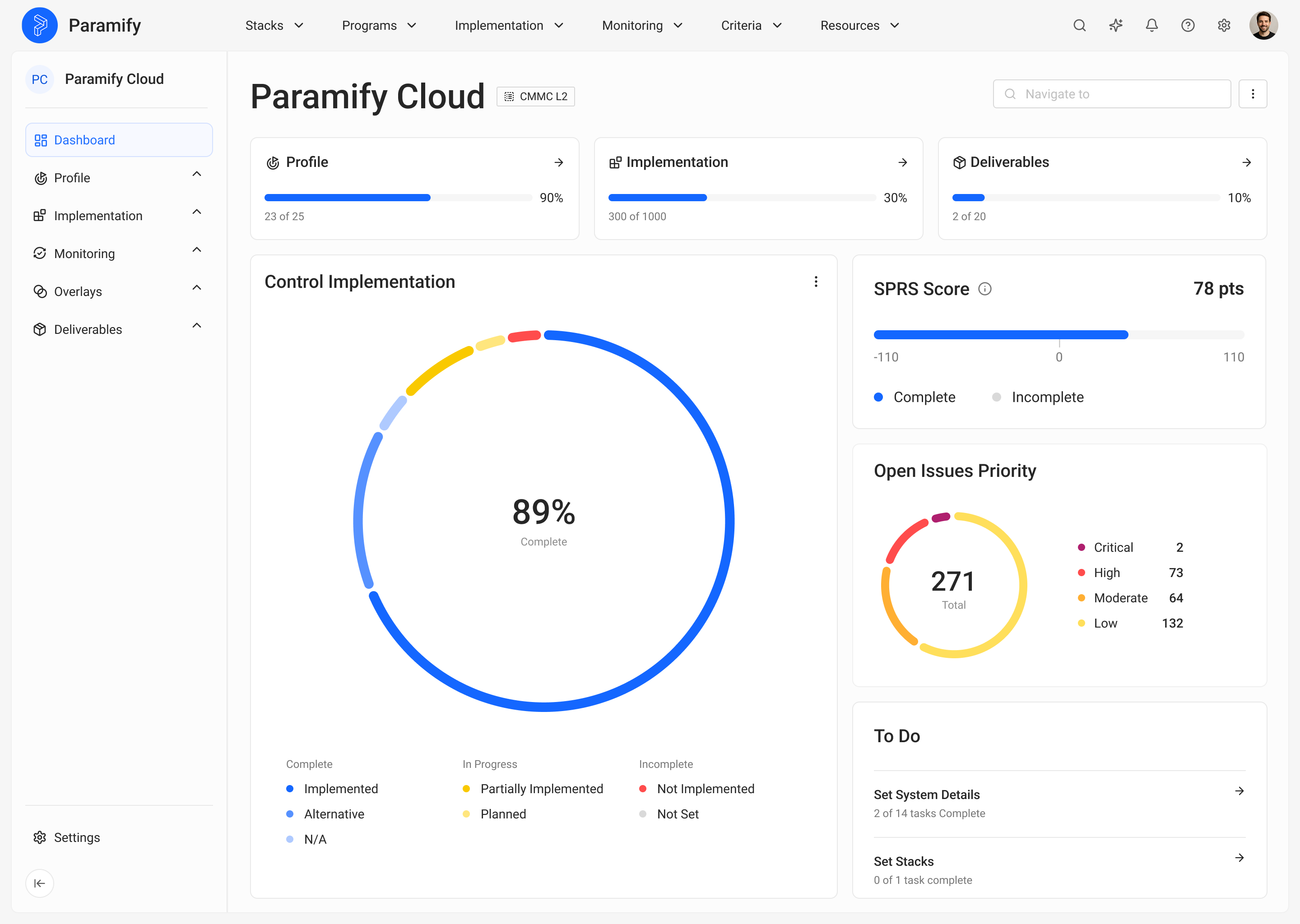
→ Request your personalized Paramify demo to see how much simpler good security can be
Phase 3: Remediate and Document
- Start closing the highest-priority gaps identified in your POA&Ms.
- Begin drafting your SSP if you do not have one. Update it if you do.
- Write or update your security policies and SOPs for each control family.
- Implement quick wins: enforce MFA, enable full-disk encryption, deploy EDR to all endpoints, set up centralized logging.
- Engage with a Registered Practitioner Organization (RPO) or consultant if you need help.
- Start collecting evidence artifacts systematically — screenshots, exports, logs, training records.
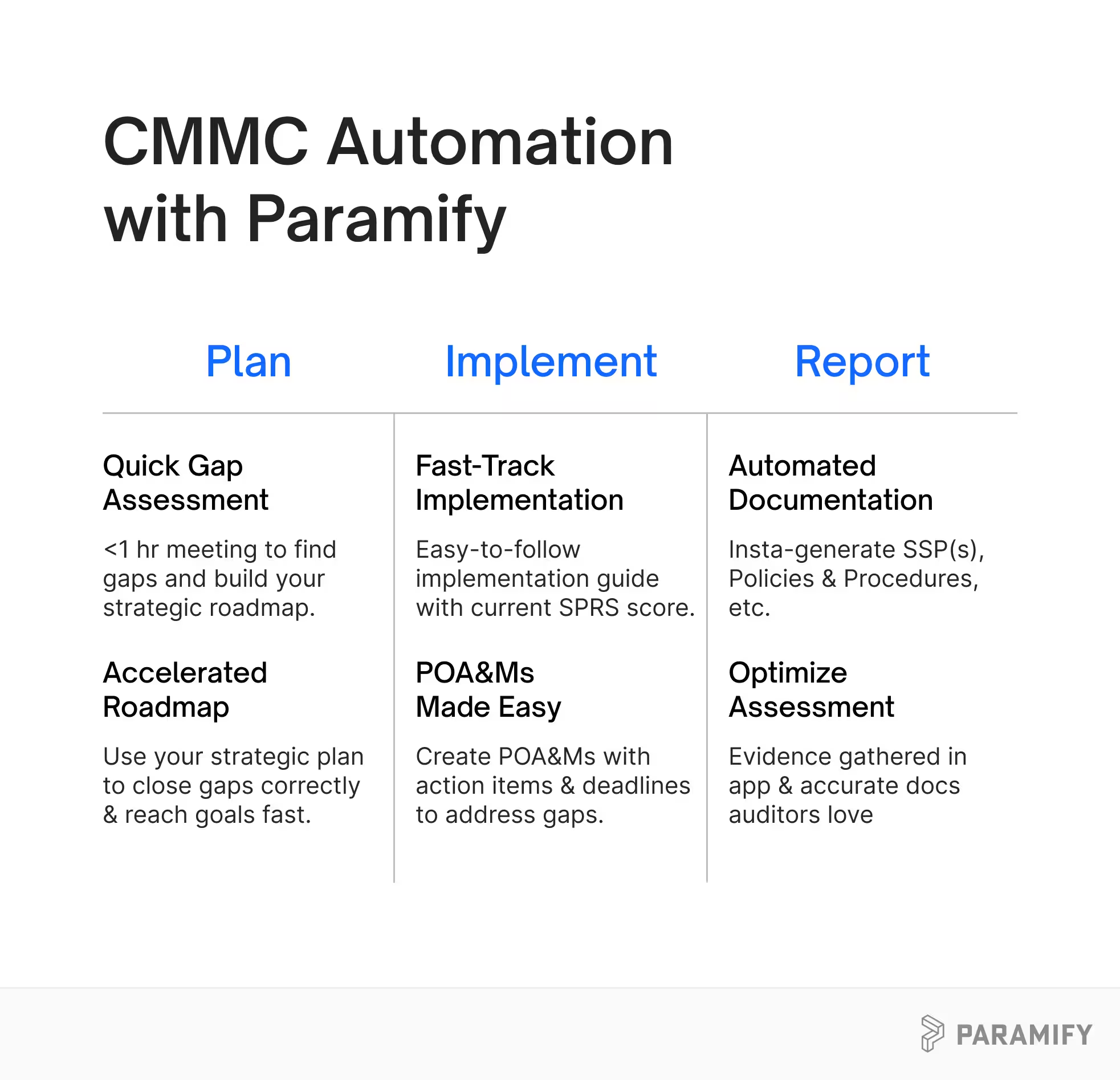
If you’re at this stage, you should not be writing and/or updating your SSP, or Policies & Procedures by hand, or paying someone to do it. Automating documentation allows you to create more accurate documentation, cut costs, and meet deadlines, while keeping the focus on what actually matters — excellent security.
CMMC After the First 90 Days
After the first 90 days, you should have a clear picture of where you stand, a documented plan to get where you need to be, and momentum in closing your gaps. From there, the timeline to full readiness depends on the size of your environment and the maturity of your existing security program. Plan for 12-18 months total for a first-time assessment.
CMMC is not going away. The days of self-attestation with no verification are over. But here is the thing — the requirements in CMMC are not unreasonable. They represent what competent cybersecurity looks like. If you do the work, and you do it honestly, you will not only pass your assessment, you will also be a harder target for the adversaries who are out there right now, probing the defense supply chain for their next victim.
Protect the data. Earn the certification. Win the contracts. That is the CMMC promise — and it starts with understanding what you are up against.
How Can You Automate CMMC With Paramify?
Here's what we'll tell any contractor who asks us straight: manual CMMC documentation is dead. Writing an SSP by hand, or paying a consultant $40k+ to write one for you, is the slowest, most expensive, most error-prone path to certification.
If that sounds like the corner you're painted into, we can help. If it doesn't, this guide is still yours. Bookmark it, share it with your team, tape the acronym table to the wall. Come back when you're ready.
→ Request a Paramify demo to see live SSP and POA&M automation mapped to all 320 CMMC objectives
→ Watch the CMMC Made Practical webinar for a deeper walkthrough of assessment prep
→ Or just email us with any questions you still have.
Protect the data. Earn the certification. Keep the contracts. That's the whole job — and the sooner you start, the less painful it gets.
Read More
- Find out how much CMMC costs to prepare your budget
- How to Streamline your CMMC process to meet timelines and stay on budget
- Compare templates vs SSP automation

.svg)
.svg)