In This Article

The FedRAMP Security Inbox requirement applies to all FedRAMP authorized services as of January 5th, 2026. This includes any cloud service listed in the FedRAMP Marketplace (Legacy Rev 5 or 20x).
Here’s what the new requirement is about and how you can implement it.
What The Security Inbox Requirement Is All About
It's pretty basic: FedRAMP wants a reliable way to directly contact security and compliance staff operating FedRAMP authorized cloud service offerings without having to go through extra customer support portals, do CAPTCHAs, or take other service-specific actions that might prevent the security team from receiving the message (FRR-FSI-11 Response). FedRAMP needs an easy way to send an email to all the security teams of FedRAMP authorized cloud service offerings and get responses to emergency communications.
These communications are often about known exploited vulnerabilities that FedRAMP wants to make sure are not going to impact federal agencies.
The good news is it's not too challenging to implement.
Enforcement Timeline
FedRAMP will begin enforcement after January 5, 2026 with an Emergency Test. Corrective actions start on March 1st of 2026 and continue to get more severe as time goes on if you don't meet these requirements (FRR-FSI-07 Corrective Actions):
- Beginning March 1, 2026: Corrective action will include public notification that the provider is not meeting expectations
- Beginning May 1, 2026: Corrective action will include complete removal from the FedRAMP Marketplace
- Beginning July 1, 2026: Corrective action will include complete removal from the FedRAMP Marketplace and a ban on FedRAMP authorization for three months
Criticality Levels
There are a few levels to know about. FedRAMP will send Emergency, Emergency Test, and Important messages, and they will ask for responses to those. They'll also measure response times that will be tracked and made publicly available (FRR-FSI-08 Response Metrics). So it's important that you're set up well to meet these requirements.
The criticality designators are (FRR-FSI-02 Criticality Designators):
- Emergency: There is a potential incident or crisis such that FedRAMP requires an extremely urgent response
- Emergency Test: FedRAMP requires an extremely urgent response to confirm the functionality and effectiveness of the FedRAMP Security Inbox
- Important: There is an important issue that FedRAMP requires the cloud service provider to address
Messages sent by FedRAMP without one of these designators are considered general communications and do not require an elevated response.
Sender Addresses
Any email that is sent from an official FedRAMP.gov or GSA.gov email address will have SPF, DKIM, and DMARC email authentication so that you can ensure it's a genuine email coming from the government (FRR-FSI-01 Verified Emails).
See the end of this article for two examples of Emergency emails sent by FedRAMP.
You need to treat any email originating from an @fedramp.gov or @gsa.gov email address as if it was sent by FedRAMP (FRR-FSI-10 Receiving Messages). If you receive these emails, you should respond.
For Emergency and Emergency Test messages specifically, FedRAMP will use the sender addresses fedramp_security@gsa.gov or fedramp_security@fedramp.gov (FRR-FSI-03 Sender Addresses).
Response Timeframes
Based on your impact level — whether you're FedRAMP Class B, C, or D — you'll have a timeframe to respond that's usually within about half a day to a couple days. The default timeframes for Emergency and Emergency Test messages are (FRR-FSI-06 Response Timeframes):
| Impact Level | Response Timeframe |
|---|---|
| Class D | Within 12 hours |
| Class C | By 3:00 p.m. Eastern Time on the 2nd business day |
| Class B | By 3:00 p.m. Eastern Time on the 3rd business day |
Class Dimpact cloud service providers are expected to address Emergency messages with a response time appropriate to operating a service where failure to respond rapidly might have a severe or catastrophic adverse effect on the U.S. Government.
Required Actions in Emails
Within these emails, there will be required actions — questions in the body of the message with steps you need to take (FRR-FSI-05 Required Actions). The emails will include specific details about how you should respond and the actions that are required.
Emergency designated messages must also be routed to a senior security official for their awareness (FRR-FSI-15 Routing).
If you don't follow the required action steps in the response timeframes, you'll face corrective actions including potentially being removed from the FedRAMP Marketplace and banned from FedRAMP authorization for a time.
What These Emails Look Like
Paramify (as a FedRAMP authorized cloud service) received a FedRAMP Emergency Directive Response to mitigate vulnerabilities in F5 devices. This came from @FedRAMP_Security@gsa.gov when there was an incident where a nation-state cyber actor was compromising F5 devices.
In the email, FedRAMP first described the issue and then in the body of the email are the actions requested for cloud service providers.
You had to look and understand if there were affected devices in your boundary. If nothing exists, then you didn't have any action. But if you had affected devices, you needed to go through the process they outlined — reaching out to CISA and following their guidance.
Configuring Your FedRAMP Security Inbox
The emails will be sent to whatever you have configured as the Security e-mail on the FedRAMP Marketplace (FRR-FSI-09 FedRAMP Security Inbox). For example, on marketplace.fedramp.gov for Paramify Cloud, the security email listed is fedramp@paramify.com. That's the email these messages are sent to.
If you establish a new inbox that's different from your current security e-mail, you must immediately notify FedRAMP by emailing info@fedramp.gov with the name and FedRAMP ID of the cloud service offering and the updated email address (FRR-FSI-12 Notification of Changes).
Setting Up a Google Group
If you're using Gmail and Google Workspace, you can configure your FedRAMP inbox as a Google Group. Here's how:
- Go to groups.google.com
- Create or locate your FedRAMP team group (e.g., fedramp@yourcompany.com)
- In Group Settings, configure it to be a collaborative inbox with shared labels
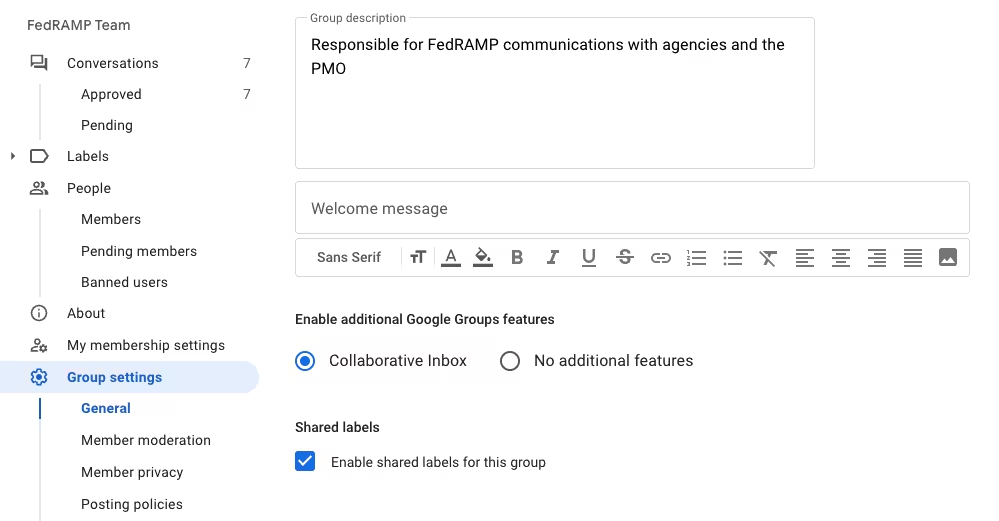
What this means is that all members will be able to share and see the conversations that are sent to this inbox. This helps support automation around receiving and responding to these emails.
Configuring Auto-Reply
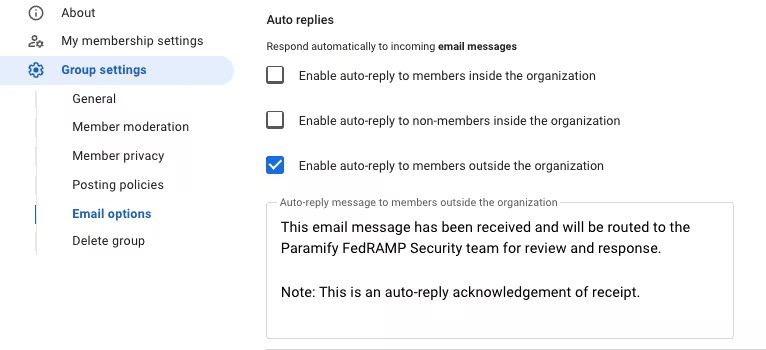
It's important to ensure you have an auto-reply set up so that FedRAMP knows it's a living inbox and that they don't have to go through any CAPTCHAs (FRR-FSI-13 Acknowledgment of Receipt). This helps the FedRAMP team know that this inbox is actively receiving messages.
In your Google Group settings:
- Scroll down to the Auto-replies section
- Enable auto-reply to members outside the organization
- Set up a simple message like:
"This email has been received and will be routed to the [Your Company] FedRAMP security team for review and response. Note: This is an auto-reply message."
Save those changes.
Setting Up Gmail Compliance Rules
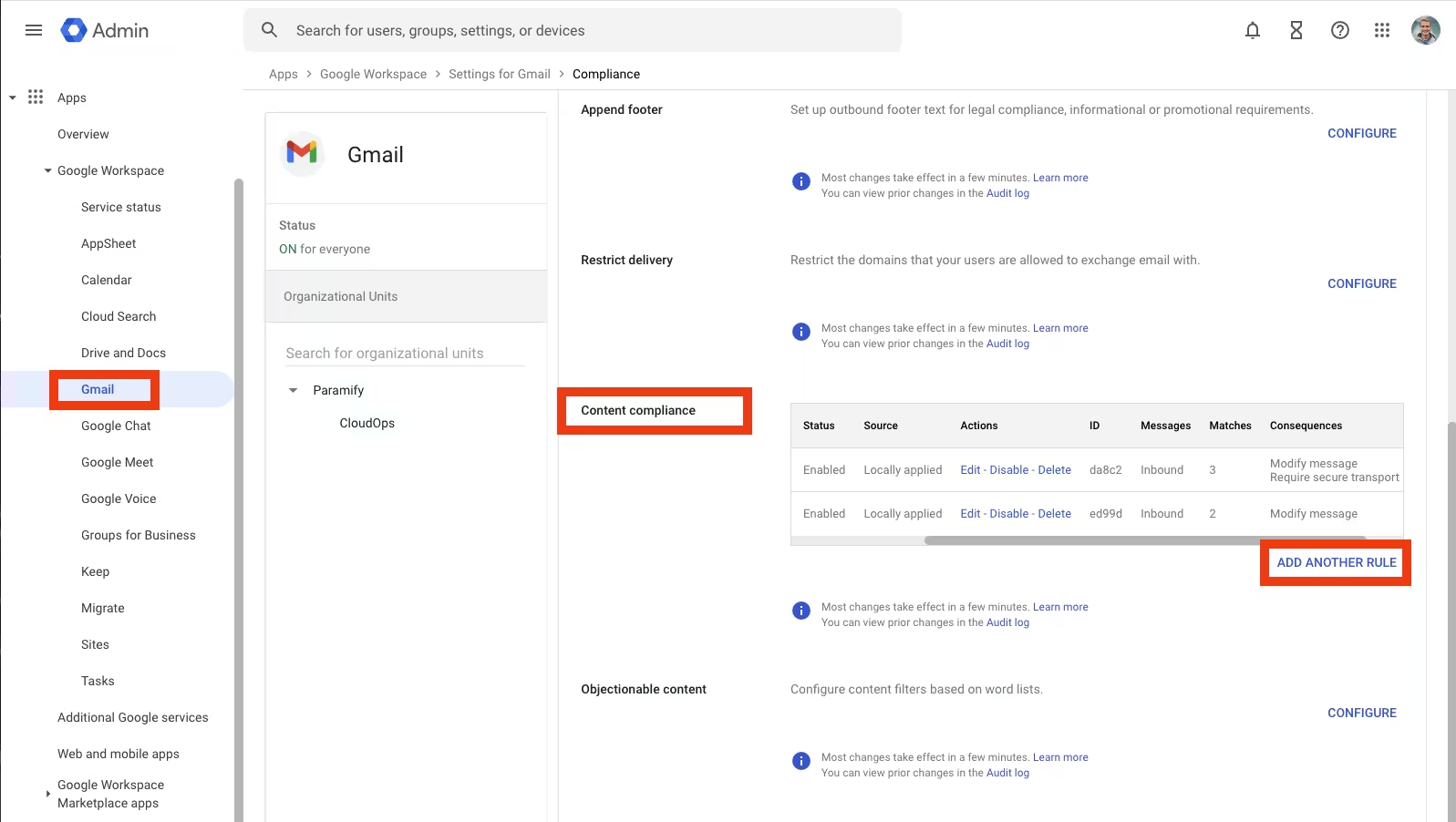
To make sure that any emails that come from the specified addresses are not blocked by your spam filters, you can configure content compliance rules in Google Admin.
- Go to admin.google.com
- Navigate to Apps > Google Workspace > Gmail
- Scroll down to the bottom where you see Compliance
- Click to Configure compliance features
- In Content compliance, click Add another rule
Configure the rule as follows:
- Name: FedRAMP Security Emails
- Messages to affect: Inbound messages
- Expressions: Set to "If ANY of the following match the message"
- First expression: Advanced content match on Sender header contains fedramp_security@gsa.gov
- Second expression: Advanced content match on Sender header contains fedramp_security@fedramp.gov
- Actions: Check the box to Bypass spam filter for this message
This will help you make sure that if emails are coming from these addresses, you're receiving them properly to your inbox.
There are additional options available — you can change the route, prepend a custom subject, or forward to additional recipients if you want to hook it into some automation you have. You can also scope the emails that are allowed based on the email signatures (eg: DKIM) from FedRAMP here.
Summary
The FedRAMP Security Inbox requirements ensure FedRAMP has a direct, reliable path to reach security teams operating FedRAMP authorized services. By setting up your inbox correctly with auto-reply enabled and spam filters configured for official FedRAMP addresses, you'll be prepared to receive and respond to emergency communications within the required timeframes.
For the complete requirements, visit the FedRAMP Security Inbox documentation.
If you need help getting or maintaining FedRAMP without the hassle you've come to expect, schedule a demo today — we'd love to help.
Appendix: Example FedRAMP Emergency Emails
The following are examples of what FedRAMP emergency emails look like, including email headers for reference.
Example 1: F5 Vulnerability Emergency Directive
X-Original-Sender: FedRAMP_Security@gsa.gov
X-Original-Authentication-Results: mx.google.com;
       dkim=pass header.i=@gsa.gov header.s=google header.b=LHY3LDg3;
       spf=pass (google.com: domain of fedramp_security@gsa.gov designates 209.85.220.41 as permitted sender) smtp.mailfrom=fedramp_security@gsa.gov;
       dmarc=pass (p=REJECT sp=REJECT dis=NONE) header.from=gsa.gov;
       dara=neutral
X-Original-From: FedRAMP Security <FedRAMP_Security@gsa.gov>
Reply-To: FedRAMP Security <FedRAMP_Security@gsa.gov>

Subject: FedRAMP Emergency Directive Response to ED 26-01

Content-Type: text/plain; charset="UTF-8"
Content-Transfer-Encoding: quoted-printable

On Wednesday, October 15, 2025, the Department of Homeland Security (DHS) Cybersecurity and Infrastructure Security Agency (CISA) issued “Emergency Directive 26-01: Mitigate Vulnerabilities in F5 Devices” (the Emergency Directive). The Emergency Directive states the following:

A nation-state affiliated cyber threat actor has compromised F5’s systems and exfiltrated files, which included a portion of its BIG-IP source code and vulnerability information. The threat actor’s access to F5’s proprietary source code could provide that threat actor with a technical advantage to exploit F5 devices and software. The threat actor’s access could enable the ability to conduct static and dynamic analysis for identification of logical flaws and zero-day vulnerabilities as well as the ability to develop targeted exploits.

This cyber threat actor presents an imminent threat to federal networks using F5 devices and software. Successful exploitation of the impacted F5 products could enable a threat actor to access embedded credentials and Application Programming Interface (API) keys, move laterally within an organization’s network, exfiltrate data, and establish persistent system access. This could potentially lead to a full compromise of target information systems.

CISA has assessed these conditions pose an unacceptable risk to agencies and necessitate immediate emergency action involving the following F5 products:

Hardware: BIG-IP iSeries, rSeries, or any other F5 device that has reached end of support

Software: All devices running BIG-IP (F5OS), BIG-IP (TMOS), Virtual Edition (VE), BIG-IP Next, BIG-IQ, and BIG-IP Next for Kubernetes (BNK)/Cloud-Native Network Functions (CNF)


ACTIONS REQUESTED FOR CLOUD SERVICE PROVIDERS

FedRAMP Authorized cloud service offerings are requested to determine if there are affected devices within their FedRAMP authorization boundary. If no affected devices exist, no further action is required and you may disregard the rest of this message (you may optionally report that your cloud service is not affected).

If affected devices exist in your environment, please take the following steps:

(1) Immediate vulnerability response action must be completed by Wednesday, October 22, 2025 to patch or otherwise address the potential adverse impact on affected devices, including:

Identify if management interfaces on affected devices are accessible via the public internet; if so, remove, harden or otherwise mitigate the risk of public accessibility as quickly as possible

Apply the latest vendor supplied patches on affected devices

If affected devices have passed end of support, disconnect and decommission such devices

(2) Upload related documentation to the Incident Response folder in your secure location that stores FedRAMP authorization data (such as USDA Connect) by Friday, October 24, 2025.

Recommended filename:

ED-26-01-Response-[CSP name]-[CSO name]

Note: Please replace the CSP and CSO name placeholders with your corresponding information.

Recommended content:

Are affected devices present within the FedRAMP boundary? [YES/NO]

For all affected devices, identify if the networked management interface is accessible directly from the public internet

Summary of actions taken (and to be taken)

Additional information you wish to provide to your customers

(3) Once the information from step (2) is available in your secure repository, please take the following actions to notify agency customers:

Email all agency customer Authorizing Officials (or ISSO) POCs with notification of the completed action.

Email the FedRAMP PMO with notification of the completed action at info@fedramp.gov using the following convention for your subject line: [CSP NAME | Package ID] - Response to ED 26-01.

Upload a copy of your email notifications to the incident response folder in your respective FedRAMP secure repository.

If any indication of compromise or anomalous behavior is found or there is any suspected impact to federal systems, please make sure to follow the FedRAMP Incident Communication Procedures, which includes reporting to CISA US-CERT and agency customers.

If you have any questions, please reach out to info@fedramp.gov and CyberDirectives@cisa.dhs.gov.


GUIDANCE FOR AGENCIES

Federal agency customers can access the CSP responses from the Incident Response folder in the CSP’s respective FedRAMP secure repository. Agencies should assume that a cloud service provider is not affected by the Emergency Directive if no response is uploaded or emailed. If agency personnel need access to a CSP’s repository for review, please submit a FedRAMP Package Access Request Form to package-access@fedramp.gov.

References

1.https://www.cisa.gov/news-events/directives/ed-26-01-mitigate-vulnerabilities-f5-devices

2.https://www.fedramp.gov/2025-10-15-responding-to-cisa-emergency-directive-26-01/
Example 2: Cisco Device Potential Compromise
X-Original-Sender: FedRAMP_Security@gsa.gov
X-Original-Authentication-Results: mx.google.com;
       dkim=pass header.i=@gsa.gov header.s=google header.b=OMUMq2+j;
       spf=pass (google.com: domain of fedramp_security@gsa.gov designates 209.85.220.41 as permitted sender) smtp.mailfrom=nicole.m.thompson@gsa.gov;
       dmarc=pass (p=REJECT sp=REJECT dis=NONE) header.from=gsa.gov;
       dara=pass
X-Original-From: "Nicole Thompson (FedRAMP)" <FedRAMP_Security@gsa.gov>
Reply-To: "Nicole Thompson (FedRAMP)" <FedRAMP_Security@gsa.gov>
Precedence: list
Mailing-list: list fedramp@paramify.com; contact fedramp+owners@paramify.com
List-ID: <fedramp.paramify.com>
X-Spam-Checked-In-Group: fedramp@paramify.com
X-Google-Group-Id: 604286477318

Subject: FedRAMP Emergency Directive Response to ED 25-03
Content-Type: text/plain; charset="UTF-8"
Content-Transfer-Encoding: quoted-printable
On Thursday, September 25, 2025, the Department of Homeland Security (DHS) Cybersecurity and Infrastructure Security Agency (CISA) issued “Emergency Directive 25-03: Identify and Mitigate Potential Compromise of Cisco Devices” (the Emergency Directive). The Emergency Directive states the following:
CISA is aware of an ongoing exploitation campaign by an advanced threat actor targeting Cisco Adaptive Security Appliances (ASA). The campaign is widespread and involves exploiting zero-day vulnerabilities to gain unauthenticated remote code execution on ASAs, as well as manipulating read-only memory (ROM) to persist through reboot and system upgrade. This activity presents a significant risk to victim networks. Cisco assesses that this campaign is connected to the ArcaneDoor activity identified in early 2024 and that this threat actor has demonstrated a capability to successfully modify ASA ROM at least as early as 2024. These zero-day vulnerabilities in the Cisco ASA platform are also present in specific versions of Cisco Firepower. Firepower appliances' Secure Boot would detect the identified manipulation of the ROM.
CISA has assessed that the following CVEs pose an unacceptable risk to federal information systems:
CVE-2025-20333 – allows for remote code execution
CVE-2025-20362 – allows for privilege escalation

ACTIONS REQUESTED FOR CLOUD SERVICE PROVIDERS
FedRAMP Authorized cloud service offerings are requested to determine if there are affected devices within their FedRAMP authorization boundary. If no affected devices exist you may disregard the rest of this message.
If affected devices exist in your environment please document the applicability and/or actions taken for your agency customers and notify FedRAMP and agency authorizing officials.
(1) Documentation to deliver to agency customers

Recommended filename: ED-25-03-Response-CSP-CSO
Recommended content:
Are Cisco ASA devices present within the FedRAMP boundary? [YES/NO]
Number / Percentage of affected devices
Are indicators of compromise present? [YES/NO]
Summary of actions taken (and to be taken) to address the relevant CVEs
Additional information you wish to provide to your customers

Please upload responses to your secure location that stores FedRAMP authorization data (such as USDA Connect) by 11:59 PM Eastern Standard Time on Thursday, October 2, 2025.

(2) Notifications of delivery to agency customers

Once the information from step (1) is available in your secure repository, please take the following actions to notify agency customers:

Email all agency customer Authorizing Officials (or ISSO) POCs with notification of the completed action.
Email the FedRAMP PMO with notification of the completed action at info@fedramp.gov using the following convention for your subject line: [CSP NAME | Package ID] - Response to ED 25-03.
Upload a copy of your email notifications to the incident response folder in your respective FedRAMP secure repository.

If any indication of compromise or anomalous behavior is found or there is any suspected impact to federal systems, please make sure to follow the FedRAMP Incident Communication Procedures, which includes reporting to CISA US-CERT and agency customers.
If you have any questions, please reach out to info@fedramp.gov and CyberDirectives@HQ.dhs.gov.
GUIDANCE FOR AGENCIES
Federal agency customers can access the CSP responses from the Incident Response folder in the CSP’s respective FedRAMP secure repository. Agencies should assume that a cloud service provider is not affected by the Emergency Directive if no response is uploaded or emailed. If agency personnel need access to a CSP’s repository for review, please submit a FedRAMP Package Access Request Form to package-access@fedramp.gov.
References
https://www.cisa.gov/news-events/directives/ed-25-03-identify-and-mitigate-potential-compromise-cisco-devices
https://www.cve.org/CVERecord?id=CVE-2025-20333
https://www.cve.org/CVERecord?id=CVE-2025-20362
Note: The example emails above are illustrative representations based on actual FedRAMP emergency communications. Headers have been sanitized and some values are representative examples to demonstrate the structure and authentication mechanisms (SPF, DKIM, DMARC) that validate genuine FedRAMP communications.

.svg)
.svg)